ゲームをプレイ
Powered by EmulatorJS · Arcade
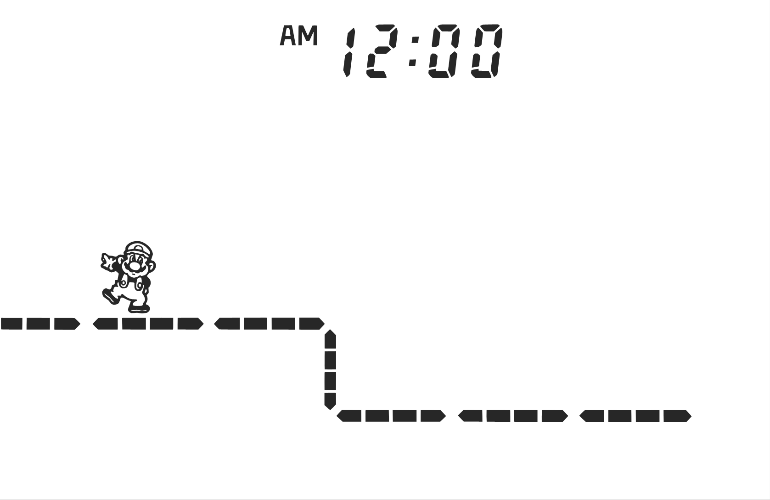
40年前に発売された携帯ゲーム機: スーパーマリオブラザーズ (c)1986 Nintendo Co., Ltd. 全体的なプロットはコンソール版のスーパーマリオブラザーズと同じですが、ゲームはより短く、よりシンプルです。クッパがキノコ姫を誘拐したので、マリオは彼女を救いに行きます。違いは、マリオは各レベルの最後にボスと戦うことなくプリンセスを見つけることができることです。マリオは、落ちたり命を失うことなく、8 つの自動スクロール レベルを通過しなければなりません。レベルをクリアすると マリオは次のループでそれらを繰り返す必要があります。 2周目以降は敵が出現します。レベルには 2 種類あります。スクロール画面 レベルとタイマー画面レベル。スクロール画面のレベルでは、マリオは画面に表示された一定の距離を移動する必要があります。タイマー画面レベルでは、マリオは指定された時間内に世界を通過する必要があります。 - 技術 - 型式 YM-801 - トリビア - 日本では1986年6月25日(水)に公開。これはクリスタル スクリーン シリーズの最初のタイトルであり、ニュー ワイド スクリーン バージョンよりもはるかにレアです。 征服すべき 8 つの異なる世界があり、右から左にスクロールする世界もあれば、時間制限のある固定画面の世界もあります。 - ヒントとコツ - ゲームキーを押し続けると、以前の最高スコアが表示されます。
If you are exploring by feel rather than by title, jump from the tags above into the matching genre rooms, or return to the Arcade hall for the full wall.
Open Play on this page to start Game & Watch: Super Mario Bros. (Crystal Screen). Keyboard, USB/Bluetooth pads, and the on-screen touch gamepad all work inside the emulator bar. Save states and fullscreen live on that same bar so you can pause mid-session and resume later.
Genre tags on Classic Arcade Games: Handheld, Arcade.
Nearby cabinets you may also open from this hall (each on its own play page):Retro Dance Mat (110 song Super StepMania + 9-in-1 games) (PAL), Alien Attack, Alien Chase, Dribble Away Basketball, BittBoy Mini FC 300 in 1, Kick The Goal Soccer, Pengo (Bandai), Ultraman Monster Battle, Who Wants to Be a Millionaire? (Character Options, Plug and Play, UK), Cybiko Classic (V1), Double Dance Mania - Techno Light Edition, Dance Dance Revolution Disney Mix
Retro Dance Mat (110 song Super StepMania + 9-in-1 games) (PAL) · Alien Attack · Alien Chase · Dribble Away Basketball · BittBoy Mini FC 300 in 1 · Kick The Goal Soccer · Pengo (Bandai) · Ultraman Monster Battle · Who Wants to Be a Millionaire? (Character Options, Plug and Play, UK) · Cybiko Classic (V1) · Double Dance Mania - Techno Light Edition · Dance Dance Revolution Disney Mix
Yes. Classic Arcade Games hosts Game & Watch: Super Mario Bros. (Crystal Screen) as a Arcade cabinet you can start on this page. The emulator loads in the browser; you do not need to install a separate app.
Arcade stick feel: Arrow keys for the joystick, X/Z (and nearby keys) for buttons, Enter=Start. USB / Bluetooth pads map cleanly; six-button fighters use the face-button cluster.
Our catalog tags Game & Watch: Super Mario Bros. (Crystal Screen) under Handheld, Arcade. Open those genre rooms from the tags on this page to find more playable cabinets in the same feel.
下の iframe コードをコピーして、このゲームをサイトに埋め込めます。
<iframe src="https://ja.classicarcade.games/games/arcade/gnw_smb?embed=1" width="800" height="600" allowfullscreen allow="gamepad; autoplay; fullscreen"></iframe>