ゲームをプレイ
Powered by EmulatorJS · Arcade
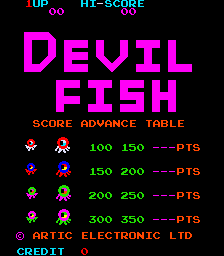
44 年前に発行されたアーケード ビデオ ゲーム: デビルフィッシュ (c) 1982 Artic Electronics. プレイヤーは Sea Dog を操作します。Sea Dog は、デビルフィッシュが太りすぎて先に進むことができないため、迷路のいくつかの通路に自分自身を閉じ込めるためにデビルフィッシュに餌を与えなければなりません。彼らが閉じ込められたら、シードッグは彼らに触れなければなりません。その直後、迷路の中央に小さな家が現れます。タッチすると絵の一部が現れます。完全なイメージが表示され、Sea Dog が次のレベルに進むまでこの手順を繰り返します。 - 技術 - メインCPU:Zilog Z80(@3.072Mhz) サウンドCPU:Zilog Z80(@1.78975Mhz) サウンドチップ: (2x) General Instrument AY8910 (@ 1.78975 Mhz) プレイ人数: 2人 コントロール: 4方向ジョイスティック ボタン: 1 - トリビア - デビルフィッシュは1982年3月にリリースされました。 このゲームの海賊版は 1984 年に Vision によって Galaxian ハードウェアでリリースされました。 - 得点 - タイプ 1 の小型タコを倒す: 100 ポイント。 タイプ 1 の大きなタコを倒す: 150 ポイント。 タイプ 2 の小さなタコを倒す: 150 ポイント。 タイプ 2 の大きなタコを倒す: 200 ポイント。 タイプ 3 の小さなタコを倒す: 200 ポイント。 タイプ 3 の大きなタコを倒す: 250 ポイント。 タイプ 4 の小さなタコを倒す: 250 ポイント。 タイプ 4 の大きなタコを倒す: 300 ポイント。 - ヒントとコツ - * スコアを増やすために、一度に複数のタコをゲートに誘い込んでみてください。 * 次の画面ではより速い敵が登場するため、どの画面でもあまり遅れないようにしてください。 * 追いかけてくるタコが罠にはまるとわかっているゲートの反対側で待ち、罠にかかったらすぐに取り除きます。死んだタコの後ろに別のタコがいた場合は、ゲートを越えて戻り、動けなくなったときに殺します。
Player layout in our catalog: 2P alt.
If you are exploring by feel rather than by title, jump from the tags above into the matching genre rooms, or return to the Arcade hall for the full wall.
Open Play on this page to start Devil Fish. Keyboard, USB/Bluetooth pads, and the on-screen touch gamepad all work inside the emulator bar. Save states and fullscreen live on that same bar so you can pause mid-session and resume later.
Player layout on this cabinet: 2P alt.
Genre tags on Classic Arcade Games: Maze, Arcade.
Nearby cabinets you may also open from this hall (each on its own play page):BnB Arcade, Vs. Battle City, Crush Roller (set 1), Dangerous Dungeons (set 1), Digger Man (prototype), Domino Man, The Electric Yo-Yo (set 1), Eyes (US set 1), Inferno (Williams), Kram (set 1), Mad Donna (Tuning, set 1), Money Money (set 1)
Yes. Classic Arcade Games hosts Devil Fish as a Arcade cabinet you can start on this page. The emulator loads in the browser; you do not need to install a separate app.
Arcade stick feel: Arrow keys for the joystick, X/Z (and nearby keys) for buttons, Enter=Start. USB / Bluetooth pads map cleanly; six-button fighters use the face-button cluster.
Our catalog tags Devil Fish under Maze, Arcade. Open those genre rooms from the tags on this page to find more playable cabinets in the same feel.
下の iframe コードをコピーして、このゲームをサイトに埋め込めます。
<iframe src="https://ja.classicarcade.games/games/arcade/devilfsh?embed=1" width="800" height="600" allowfullscreen allow="gamepad; autoplay; fullscreen"></iframe>