ゲームをプレイ

Powered by EmulatorJS · Arcade
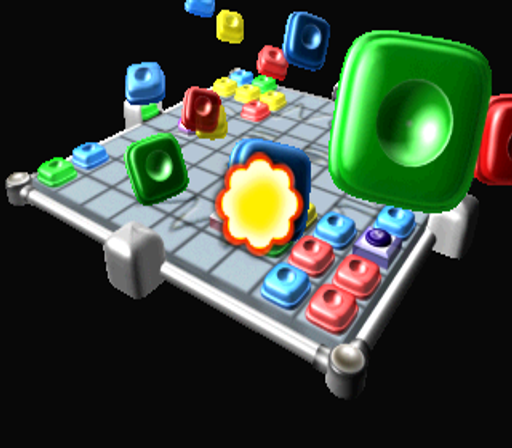
Eolith は 1999 年頃にこのパズル タイトルを開発し、ドロップ メカニクスを利用してプレイヤーに挑戦させました。落ちてくるピースをナビゲートするには、ラインをクリアして画面がいっぱいになるのを防ぐための正確なタイミングが必要ですが、これはドロップ スタイルのジャンルに特有のコア ループです。
Player layout in our catalog: 2P sim.
If you are exploring by feel rather than by title, jump from the tags above into the matching genre rooms, or return to the Arcade hall for the full wall.
Open Play on this page to start Candy Candy. Keyboard, USB/Bluetooth pads, and the on-screen touch gamepad all work inside the emulator bar. Save states and fullscreen live on that same bar so you can pause mid-session and resume later.
Candy Candy is filed in our catalog as a 1999 release.
Player layout on this cabinet: 2P sim.
Genre tags on Classic Arcade Games: Puzzle.
Credit line lists Eolith as developer.





Nearby cabinets you may also open from this hall (each on its own play page):Hidden Catch 2 (pcb ver 3.03) (Kor/Eng) (AT89c52 protected), Hidden Catch 3 (ver 1.00 / pcb ver 3.05), Hidden Catch 2000 (AT89c52 protected), Hidden Catch (World) / Tul Lin Gu Lim Chat Ki '98 (Korea) (pcb ver 3.03), Land Breaker (World) / Miss Tang Ja Ru Gi (Korea) (pcb ver 3.02), Linky Pipe, New Hidden Catch (World) / New Tul Lin Gu Lim Chat Ki '98 (Korea) (pcb ver 3.02), Penfan Girls - Step1. Mild Mind (set 1), Fortress 2 Blue Arcade (World) (ver 1.01 / pcb ver 3.05), Iron Fortress, KlonDike+, Crazy War
Hidden Catch 2 (pcb ver 3.03) (Kor/Eng) (AT89c52 protected) · Hidden Catch 3 (ver 1.00 / pcb ver 3.05) · Hidden Catch 2000 (AT89c52 protected) · Hidden Catch (World) / Tul Lin Gu Lim Chat Ki '98 (Korea) (pcb ver 3.03) · Land Breaker (World) / Miss Tang Ja Ru Gi (Korea) (pcb ver 3.02) · Linky Pipe · New Hidden Catch (World) / New Tul Lin Gu Lim Chat Ki '98 (Korea) (pcb ver 3.02) · Penfan Girls - Step1. Mild Mind (set 1) · 3X3 Puzzle (Enterprise) · Aqua Rush (Japan, AQ1/VER.A1) · Bubble 2000 · Chicken Farm (Version 2.0)
Hidden Catch 2 (pcb ver 3.03) (Kor/Eng) (AT89c52 protected) · Hidden Catch 3 (ver 1.00 / pcb ver 3.05) · Hidden Catch 2000 (AT89c52 protected) · Hidden Catch (World) / Tul Lin Gu Lim Chat Ki '98 (Korea) (pcb ver 3.03) · Land Breaker (World) / Miss Tang Ja Ru Gi (Korea) (pcb ver 3.02) · Linky Pipe · New Hidden Catch (World) / New Tul Lin Gu Lim Chat Ki '98 (Korea) (pcb ver 3.02) · Penfan Girls - Step1. Mild Mind (set 1) · Fortress 2 Blue Arcade (World) (ver 1.01 / pcb ver 3.05) · Iron Fortress · KlonDike+ · Crazy War
Eolith appears on this cabinet’s credit line. Browse more titles from the same studio on the developer shelf, or stay on this page and try the next cabinets in the same hall.
Hidden Catch 2 (pcb ver 3.03) (Kor/Eng) (AT89c52 protected) · Hidden Catch 3 (ver 1.00 / pcb ver 3.05) · Hidden Catch 2000 (AT89c52 protected) · Hidden Catch (World) / Tul Lin Gu Lim Chat Ki '98 (Korea) (pcb ver 3.03) · Land Breaker (World) / Miss Tang Ja Ru Gi (Korea) (pcb ver 3.02) · Linky Pipe · New Hidden Catch (World) / New Tul Lin Gu Lim Chat Ki '98 (Korea) (pcb ver 3.02) · Penfan Girls - Step1. Mild Mind (set 1)
Yes. Classic Arcade Games hosts Candy Candy as a Arcade cabinet you can start on this page. The emulator loads in the browser; you do not need to install a separate app.
Arcade stick feel: Arrow keys for the joystick, X/Z (and nearby keys) for buttons, Enter=Start. USB / Bluetooth pads map cleanly; six-button fighters use the face-button cluster.
Our catalog tags Candy Candy under Puzzle. Open those genre rooms from the tags on this page to find more playable cabinets in the same feel.
下の iframe コードをコピーして、このゲームをサイトに埋め込めます。
<iframe src="https://ja.classicarcade.games/games/arcade/candy?embed=1" width="800" height="600" allowfullscreen allow="gamepad; autoplay; fullscreen"></iframe>